Is WP Rocket still the best WordPress cache plugin in 2026?
For years, the answer was a simple “Yes.” But with the rise of Core Web Vitals and aggressive competitors like FlyingPress and LiteSpeed Cache, the decision isn’t as simple anymore.
I’ve been using WP Rocket on this website for 7 years. To test WP Rocket against the top competitors, I installed it on a live sandbox site to test its speed, ease of use, Core Web Vitals optimization features, CDN integration, and other technical quirks so you don’t have to.
My WP Rocket review covers the good, the bad, and the new pricing reality that most other reviews are hiding from you (well, except for a few).
Quick Verdict: WP Rocket remains the gold standard for “set-it-and-forget-it” caching plugin. It’s an ideal cache plugin for beginners and WordPress agencies who need guaranteed stability and support.
However, in 2026, WP Rocket is no longer the absolute best or fastest plugin. Based on Chrome’s UX report, FlyingPress has surpassed WP Rocket in Core Web Vitals optimizations (specifically “Remove Unused CSS”, “Image optimization” & “Lazy Render” HTML elements), and LiteSpeed Cache remains superior for LiteSpeed servers (powerful server-side caching).
Download WP Rocket Cache PluginWho Should (and Shouldn’t) Use WP Rocket in 2026?
I don’t want to bore you with technical jargon like “GZIP compression”, “DNS Prefetching”, or “Browser Caching.” Let’s be honest: you don’t care about how WP Rocket works; you just want your site to load instantly.
In 2026, when it comes to WordPress speed optimization, WP Rocket isn’t the top choice anymore. Even though over 5 million websites are using the WP Rocket plugin.
I tested almost all WordPress cache plugins for Core Web Vitals. There are only 3 cache plugins that are worth using, and it’s not really debatable.
Based on the last 2 years Chrome UX Core Web Vitals report, FlyingPress (on Nginx/Apache servers) and LiteSpeed Cache (on LiteSpeed servers) perform much better than WP Rocket.
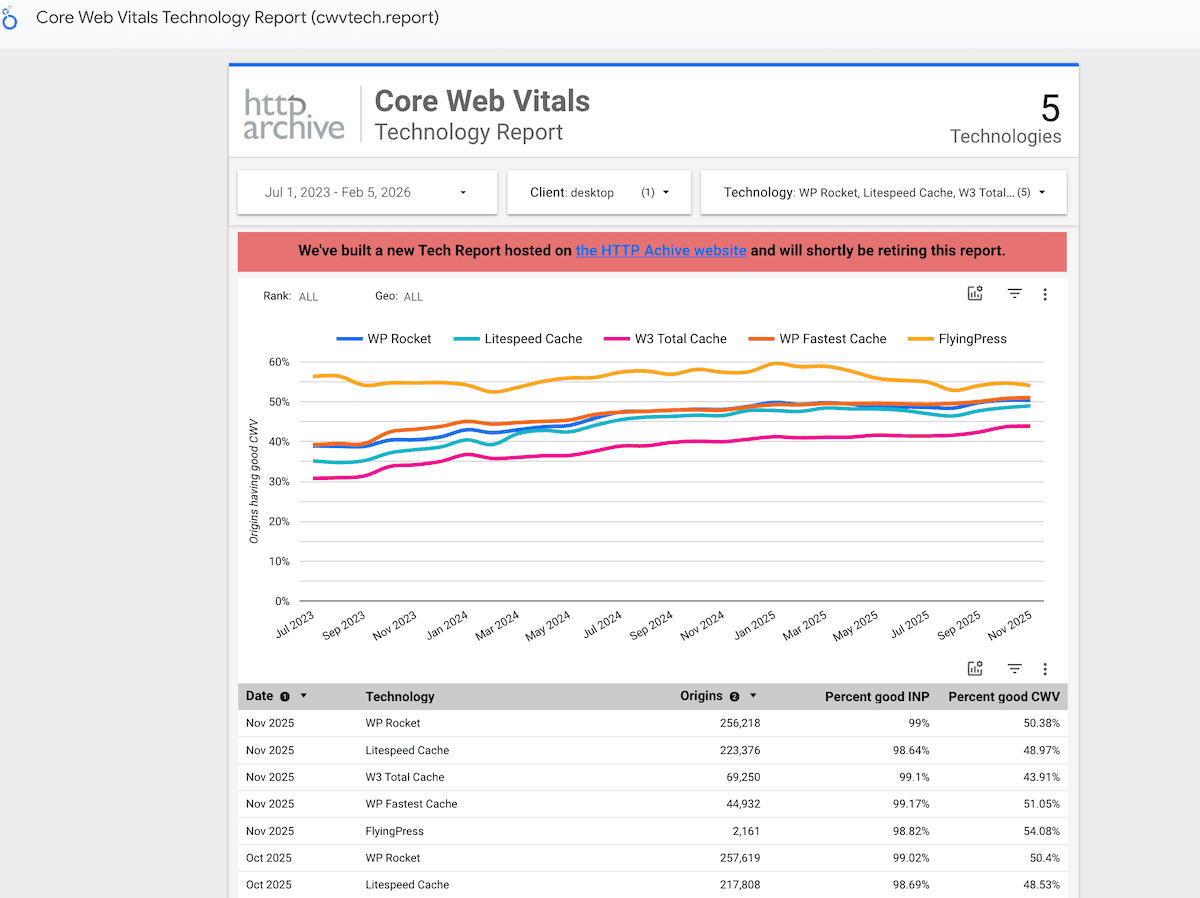
However, WP Rocket is the best option for you if you manage multiple client sites, use heavy page builders, or simply want a reliable, supported solution that won’t break your layout.
| Scenario | Recommendation | Why? |
|---|---|---|
| You want “One Click” speed | ✅ Buy WP Rocket | It applies 80% of the best practices upon activation. No breaking changes. |
| You use a LiteSpeed Server | ⚠️ Use LiteSpeed Cache | LiteSpeed Cache is free and handles server-level caching better than WP Rocket. |
| You are failing Core Web Vitals | ✅ Consider using FlyingPress | FlyingPress handles “Unused CSS”, JS optimization, & “Lazy Render” more aggressively than WP Rocket. |
If you’re unsure about your hosting server type, here are a few popular hosting providers that use LiteSpeed server: ChemiCloud, Hostinger, ScalaHosting, GreenGeeks, Hosting.com, WPX, etc.
WP Rocket Performance Benchmark (Speed test)
In 2026, Google doesn’t just care about how fast your site loads; it cares about how fast it feels and reacts with real website visitors.
To test the performance benchmark, I installed WP Rocket on a standard “bloated” setup:
- Page Builder: Elementor Pro (v3.34.0) with WooCommerce (v10.4.3)
- Hosting: Liquid Web “Spark Thrive” plan
- Theme: GeneratePress (v3.6.1)
- Caching: WP Rocket (v3.20.5)
- PHP version: v8.3 with 10 PHP workers
- CDN: Cloudflare Enterprise (by Liquid Web)
This is the hardest environment to optimize because of the heavy JavaScript and CSS files. I tested all Core Web Vitals metrics on PSI and GTMetrix. Here’s the test result:
| Metric | Before (Raw Site) | After (WP Rocket) | Change |
|---|---|---|---|
| TTFB (Time to First Byte) | 840ms | 102ms | 📉 85% Reduction |
| LCP (Largest Contentful Paint) | 4.2s | 1.6s | 🚀 70% Improvement |
| INP (Interaction to Next Paint) | 410ms | 265ms | ⚡ Passed Threshold |
| TBT (Total Blocking Time) | 1.2s | 85ms | 📉 90% Reduction |
My Website Performance (before & after using WP Rocket)
As for my website, I use WP Rocket on CloudWays Digital Ocean server with the GeneratePress theme, Cloudflare CDN, & ShortPixel image optimization plugin. Here’s my website loading time before & after configuring the WP Rocket cache plugin on GTMetrix:
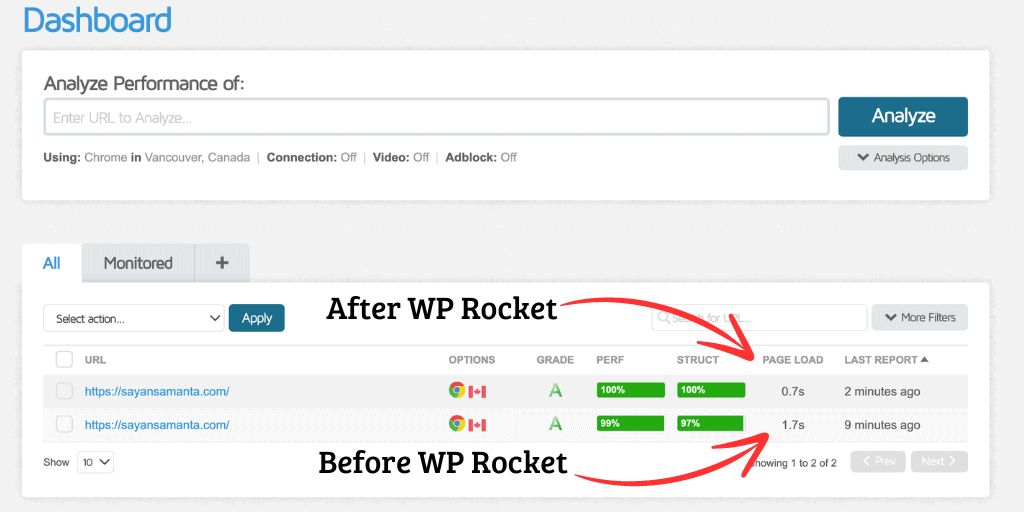
Here’s my core web vitals result after using WP Rocket on this website:
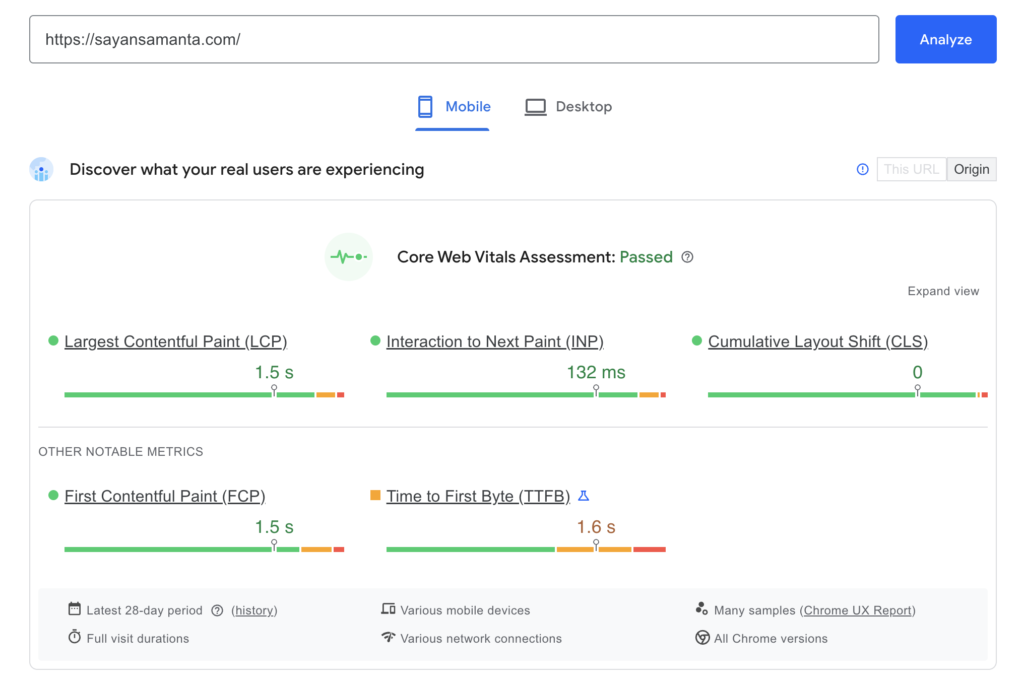
Here’s my website TTFB from 22 global locations, to see server response time, CDN cache status, detailed timings, and response headers:
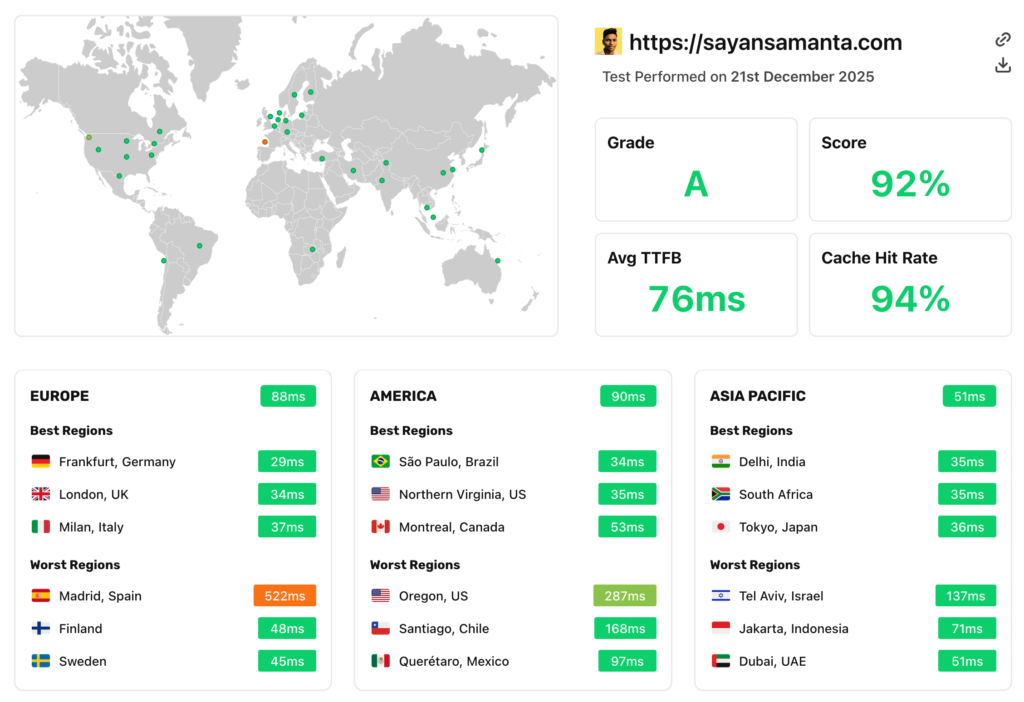
Note: Only WP Rocket alone can’t pass your website at Google Core Vitals metrics. You need a good hosting, a CDN, a light-weight WordPress theme, and a good image optimization plugin to get a better result at GTmetrix & PageSpeed Insights.
My Recommendation:
- For low-budget Hosting: ChemiCloud, ScalaHosting, or Hosting.com
- For high-budget hosting: Kinsta, Rocket.net, or CloudWays
- CDN: Cloudflare, FlyingCDN
- Theme: GeneratePress, Astra, Or KadenceWP
- Image Optimization Plugin: ShortPixel or Imagify
How WP Rocket Fixes my Website’s Core Web Vitals Scores?
Google doesn’t care about your generic “Website load time.” They care about Core Web Vitals metrics. You can use Chrome Lighthouse or PageSpeed Insights to check any website’s core web vitals performance.
Here’s how WP Rocket fixes my website’s overall core web vitals scores:
1: Fixing LCP (Largest Contentful Paint):
The Problem: LCP measures how fast the largest element (usually your hero image or H1 title) becomes fully visible. If this largest element takes longer than 2.5 seconds to load, you Core Web Vitals LCP metric.
How WP Rocket Fixes It: WP Rocket utilizes Critical CSS Generation and Image Preloading (Automatic Priority for Above-the-Fold Images) features for prioritizing and delaying the meaningful parts of the site to appear in just over a second.
- Excludes it from Lazy Load: So it loads immediately.
- Tells the browser “download Hero image before everything else: “Adds fetchpriority=”high”
- Preloads the resource: Starts the download even before the HTML is fully parsed.
2: Fixing INP (Interaction to Next Paint)
The Problem: INP measures how fast your site reacts when a user clicks a button or opens a mega menu. If a user clicks a “Menu” button and the site freezes for 0.5 seconds before opening the menu, you fail INP.
How WP Rocket Fixes It: This is usually caused by heavy JavaScript running in the background.
- Delay JavaScript Execution: WP Rocket holds back all heavy scripts (Analytics, Facebook Pixel, Chat widgets, Ads) and refuses to load them until the user interacts (moves a mouse, clicks, or scrolls). As a result, browser’s main thread stays empty and “idle,” ready to respond instantly to the user’s first click.
- Rocket Insights: WP Rocket monitors your INP score directly from your WordPress dashboard, allowing you to see if your “Delay JS Execution” is actually working or if a specific JS script is still clogging the main thread.
3: Fixing CLS (Cumulative Layout Shift)
The Problem: It measures how much your content moves around while the page is loading. If your text loads, and then an image pops in and pushes the text down, that’s a “Cumulative Layout Shift.”
How WP Rocket Fixes It:
- Font Preloading: To prevent “Flash of Unstyled Text”, WP Rocket preloads your fonts so they are available the moment the CSS is ready. Also, WP Rocket host font locally, It allows you to increase the caching period so repeat visitors don’t have to download the font files every time they come to your site.
- Add Missing Image Dimensions: WP Rocket scans your HTML and automatically adds width=”xxx” and height=”xxx” attributes to images that lack them. This reserves the exact amount of space on the screen before the image downloads, preventing the layout from “jumping” when the image appears.
WP Rocket Key Features: What Actually Moves the Needle?
I don’t want to list all WP Rocket features; for that, you can visit the WP Rocket website.
However, in this WP Rocket review, I listed the top three speed optimization features that do 90% of the heavy lifting. These features not only optimize code, it target the specific Core Web Vitals metrics Google uses to rank you.
1: Delay JavaScript Execution (The “INP” Fixer)
Since Google replaced FID with INP, and their developers confirm, better INP scores contribute to better search rankings.
WP Rocket automatically delays non-essential JavaScript until a user interacts with the page. It prevents heavy JS scripts (like Chat widgets, Ads, or Analytics) from loading until the user interaction (scroll, click, or tap).
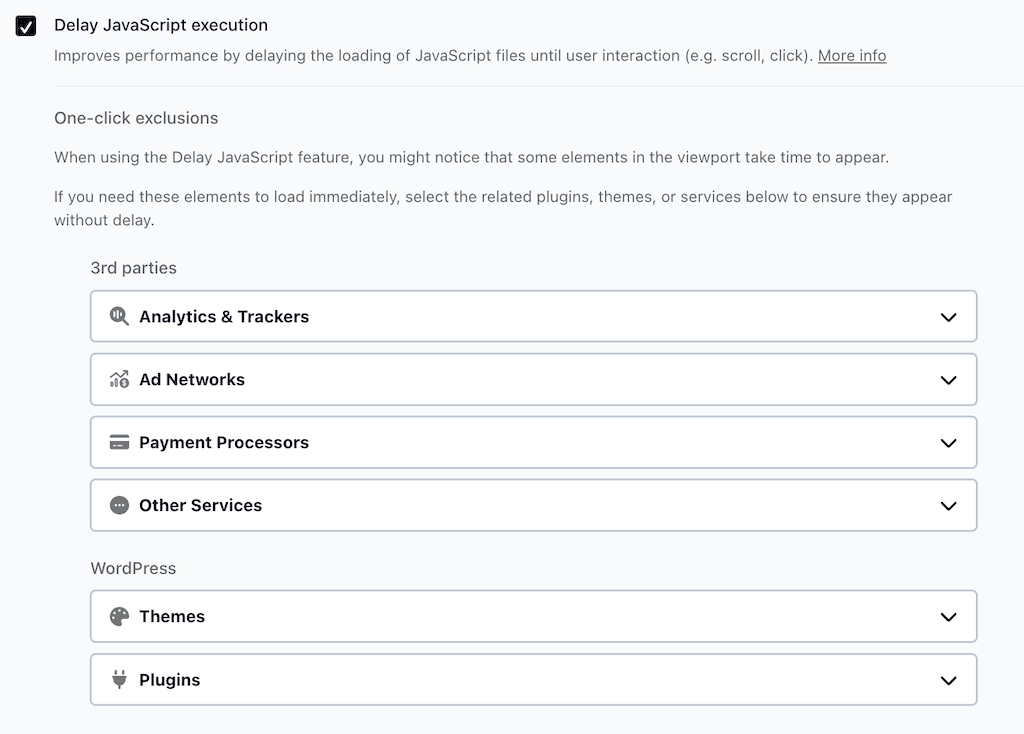
This helps improve Core Web Vitals metrics like Total Blocking Time (TBT) and INP (Interaction to Next Paint), while reducing main-thread blocking and allowing visible content to render faster. Without this, heavy JS scripts “freeze” the browser for several seconds, and it’s frustrating mobile users.
2: Remove Unused CSS (LCP & FCP Optimizer)
Most WordPress themes load massive CSS files even if the page only needs 5% of that code. By eliminating unused CSS, it reduces file size and render-blocking resources, allowing pages to display content faster and more consistently.
WP Rocket automatically collects all CSS stylesheets and scripts and sends files to WP Rocket’s external tool for processing, and the used CSS will be added as inline CSS.

This optimization helps improve LCP (Largest Contentful Paint) and reduces layout shifts, supporting better Core Web Vitals performance across mobile and desktop devices.
In my test, FlyingPress, Perfmatters, & LiteSpeed Cache plugin do a better job than WP Rocket. Because WP Rocket uses CSS as an Inline CSS file, which is slower for users and increases HTML size. While FlyingPress adds used CSS in a separate file, which is faster for real users and recommended for Core Web Vitals.
3: Smart cache Preloads
In 2026, preloading isn’t just about making your homepage load faster; it’s about predicting your visitor’s next move. Standard caching only works after a visitor opens your page. WP Rocket’s crawler acts like a human visitor, “warming up” your site before anyone arrives.
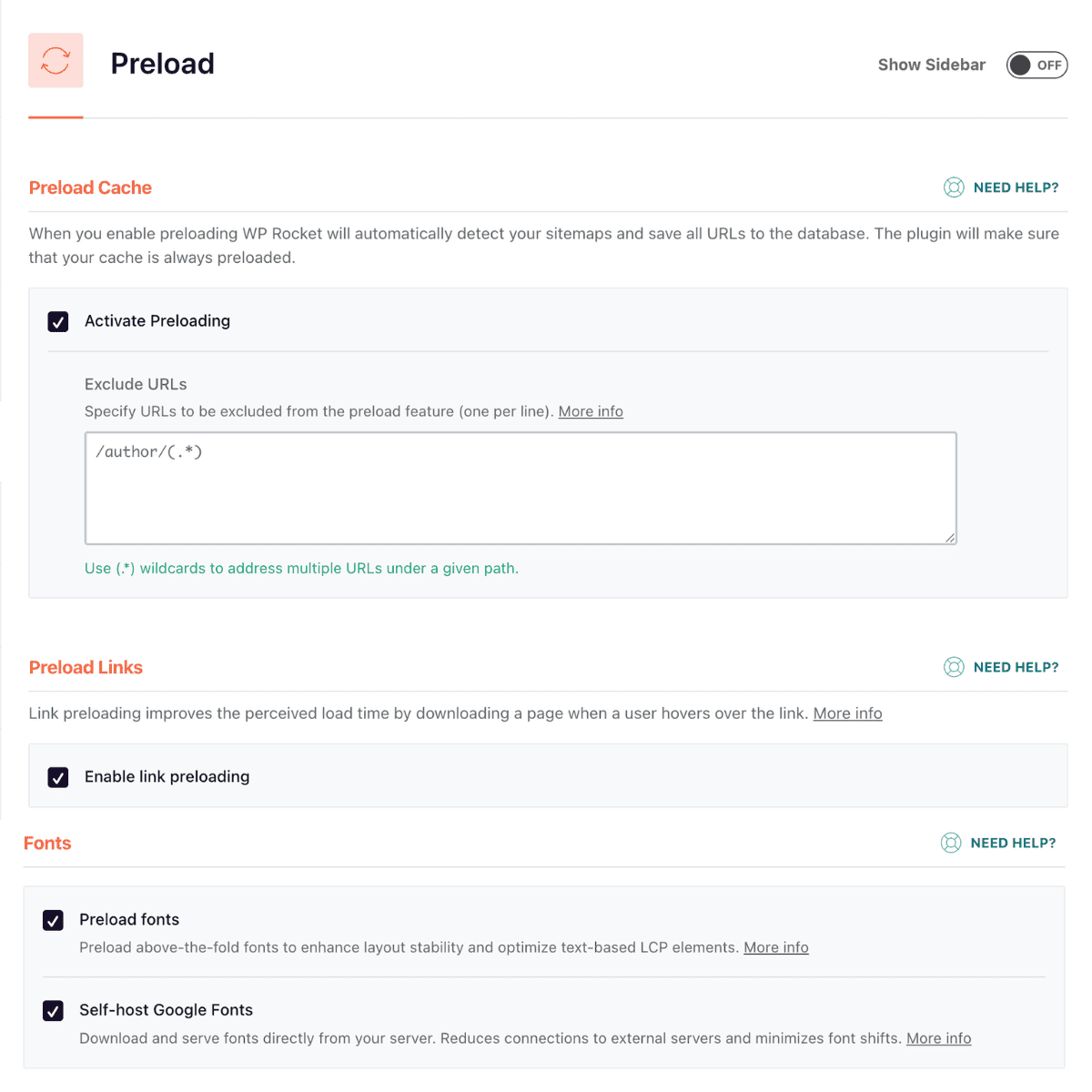
Right now, WP Rocket uses “Font preloading” to automatically detect which fonts are used “above the fold” and preloads them individually for mobile and desktop. Also, if a user hovers over a link, WP Rocket begins downloading that page in the background. By the time they actually click, the page loads instantly.
WP Rocket Pricing: Is there any Discount Available?
WP Rocket recently updated its pricing tiers. Here’s WP Rocket’s new pricing Structure:
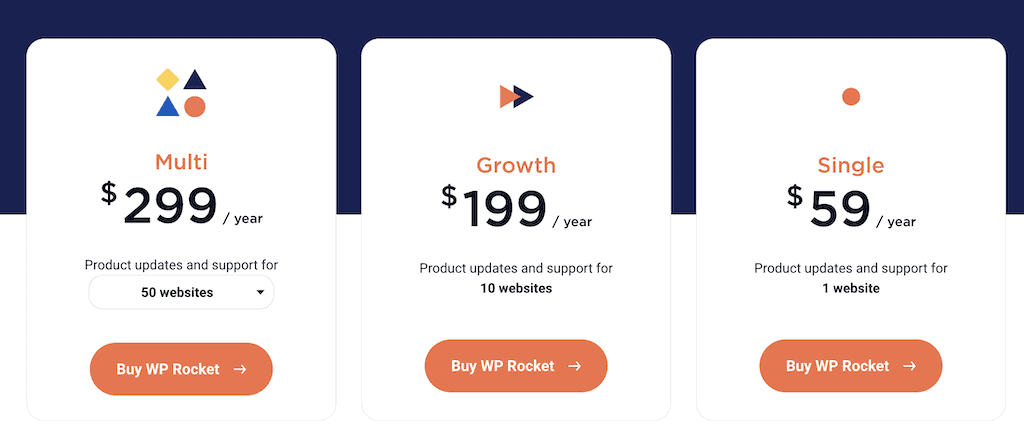
The only difference between the plans is the number of sites that are supported — there aren’t any feature limitations on these plans. If you are an agency with 500+ sites, you now need a custom enterprise license. For 99% of users, the Single or Plus plan is all you need.
| Plan | Pricing | Sites | Best for |
|---|---|---|---|
| Single | $59/Year | 1 Site | Solo bloggers and single-store owners. |
| Plus | $119/Year | 3 Sites | Growing businesses with a few niche sites. |
| Multi | $299-$599 | 50-500 | Established agencies and high-volume developers. |
Money-Back Guarantee: WP Rocket offers a 14-day refund policy. I have tested this personally, and they refunded me within 12 hours with no questions asked.
Renewal: You typically get a 20% discount on a WP Rocket expired licence. If you don’t renew, you lose access to “Remove Unused CSS,” Critical CSS generation, and all security updates.
WP Rocket Coupon Code 2026
WP Rocket does offer discount deals on special occasions like Black Friday, Spring campaign, Anniversary sale, Halloween, etc. It is usually around a 20%-40% discount on all plans, and you don’t need any coupon code.
As for an active WP Rocket coupon code, you can use my exclusive code “wprcp251128” to get 20% off. If this code has expired, here you can enter your email, and you’ll get the updated code.

Pros & Cons of WP Rocket: Is It Worth the Hype?
As said earlier, WP Rocket has a lot of improvement possibilities. To maintain a balanced view, here is my honest breakdown of where WP Rocket shines and where it falls behind newer competitors.
The Pros (Why People Stay)
- User Interface (UI): WP Rocket dashboard is clean, and most features are just a single toggle button. All features come with a basic explanation that helps a lot of non-techie users.
- Reliability: WP Rocket rarely breaks any WordPress sites. Unless you have a very complex website design. In my 7 years of WordPress journey, I have never seen WP Rocket break my site design.
- Support & Documentation: WP Rocket documentation is the Gold standard for a caching plugin, with over 500+ articles and video guides. And if you face any problem, you get a human response. This is a massive advantage over free plugins like LiteSpeed Cache.
- Database Optimization: With WP Rocket, you don’t need a separate plugin for Database optimization. With a single click, you can remove all outdated post data, trashed posts, spam comments, expired Transients, & optimize database tables.
- Heartbeat Control: WP Rocket allows you to control the WordPress Heartbeat API with a single click. You can reduce or disable heartbeat activity on the backend, post editor, & frontend.
- Local Font host: WP Rocket host Google fonts locally to make your site speed faster & GDPR compliant. Self-hosting Fonts allows you to increase the caching period so repeat visitors don’t have to download the font files every time they come to your site.
- Rocket Analysis: Recently, in WP Rocket v3.20, they added a new feature, “Rocket analysis”. To check performance score, Core Web Vitals test, run speed tests, and download the GTmetrix report directly from your WP Rocket dashboard. However, for detailed analysis, WP Rocket charges $4.99/month (FlyingPress & LiteSpeed cache do it for free).
The Cons (Why people switch)
- Feature Stagnation: Slow to add new features compared to FlyingPress.
- Infinite plan is gone: The 50-site cap on the $299 plan is a bummer for big agencies.
- Limited Cloudflare CDN integration: WP Rocket does integrate with Cloudflare using zone ID, email, and Global API keys. WP Rocket slacks full page caching at the edge (APO) unless you pay extra or use the Cloudflare plugin. It’s pretty basic Cloudflare integration compared to FlyingPress, and their own CDN, RocketCDN, is far inferior compared to FlyingCDN.
- SaaS Dependency: WP Rocket “Remove Unused CSS” relies on external servers. If their server faces downtime, WP Rocket CSS optimization won’t refresh automatically.
- No Bloat removal: WP Rocket doesn’t remove bloat from your website. FlyingPress & Perfmatter removes all boats with a single click. WP Rocket intentionally avoids bloat removal (like disabling emojis/XML-RPC) to remain “safe” for beginners.
- Render HTML Elements: WP Rocket can’t Lazy Render HTML Elements, which can improve overall TBT & LCP. However, WP Rocket uses the “Delay JS” feature to achieve a similar type of result.
- No Image optimization: Unlike FlyingPress & LiteSpeed cache plugin, WP Rocket doesn’t offer free image optimization and WebP image format conversion. WP Rocket recommends using the Imagify plugin to optimize images.
Best WP Rocket Alternatives (Spec-for-Spec Comparison)
This is the most important section of this review. Before you buy, you need to know exactly how WP Rocket stacks up against its competitors, like FlyingPress, LiteSpeed Cache, Perfmatters, W3 Total Cache, etc.
| Features | WP Rocket | FlyingPress | LS Cache | W3T Cache | Perfmatters |
|---|---|---|---|---|---|
| Price (Single Site) | $59/year | $59/year | Free | Free | $30/year |
| Setup Difficulty | ⭐ (Easiest) | ⭐(Easiest) | ⭐⭐⭐⭐ (Hard) | ⭐⭐⭐⭐⭐ (Expert) | ⭐⭐ (Medium) |
| Remove Unused CSS | ✅ Good (Inline) | 🚀 Best (Separate File) | ⚠️ Hit or Miss | ❌ Pro Only | ✅ (Separate File) |
| Local Font Hosting | ✅ Yes | ✅ Yes | ✅ Yes | ❌ Pro Only | ✅ Yes |
| Image Optimization | ❌ No | ✅ Yes | ✅ Yes | ❌ No | ❌ No |
| Lazy Render HTML | ❌ No | ✅ Yes | ✅ Yes | ❌ No | ❌ No |
| INP Optimization | ✅ Delay JS | ✅ Delay JS | ⚠️ Manual Tuning | ⚠️ Manual | ✅ Script Manager |
| Database optimization | ✅ Yes | ✅ Yes | ❌ No | ❌ No | ✅ Yes |
| Core Web Vitals Tracking | ✅ Yes ($4.99/month) | ✅ Yes (Free) | ✅ Yes (Free) | ❌ No | ❌ No |
| Bloat Removal | ❌ No | ✅ Yes | ❌ No | ❌ No | ✅ Yes |
| Support | 🚀 Top Tier | Good | Community Only | Good |
Why choose FlyingPress or LiteSpeed Cache instead of WP Rocket?
While WP Rocket is still the best all-rounder caching plugin, here is why you might jump ship:
FlyingPress: It is more aggressive. It offers “Rendering HTML” (rendering only what’s on screen) and handles Lazy background images much better than WP Rocket (It relies on “Delay JS” to achieve similar main-thread savings), which significantly reduces initial payload size. Read the FlyingPress review.
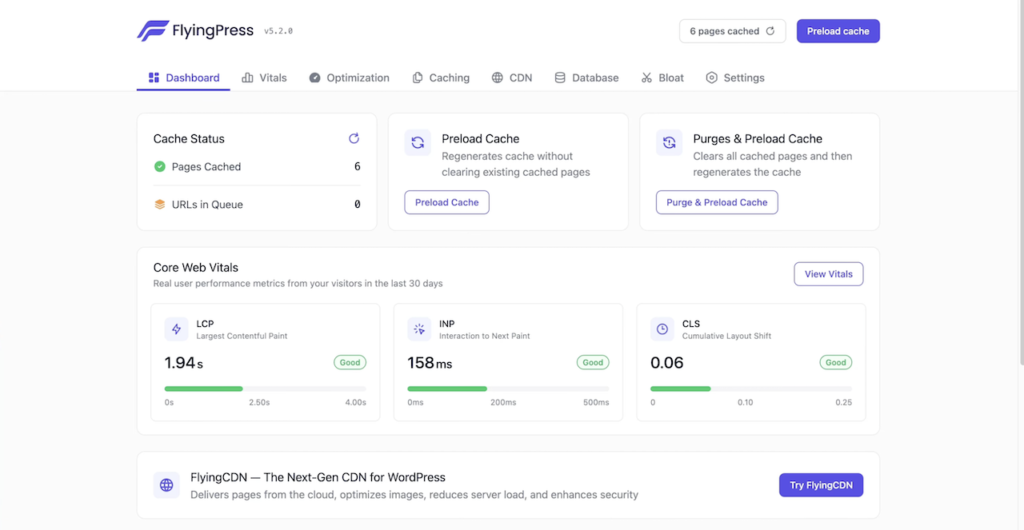
While WP Rocket inlines your “Used CSS” into the HTML, FlyingPress generates a separate, cached CSS file. This is technically cleaner and can result in slightly smaller page sizes for very complex sites. If you are a speed enthusiast chasing a 100/100 score on a heavy site, FlyingPress is the 2026 choice.
Download FlyingPress cache plugin.
LiteSpeed Cache: If your hosting uses the LiteSpeed server, use this plugin instead of FlyingPress or WP Rocket. Because LiteSpeed Cache is built into the server itself, it can purge cache directly to the server, bypassing WordPress entirely.
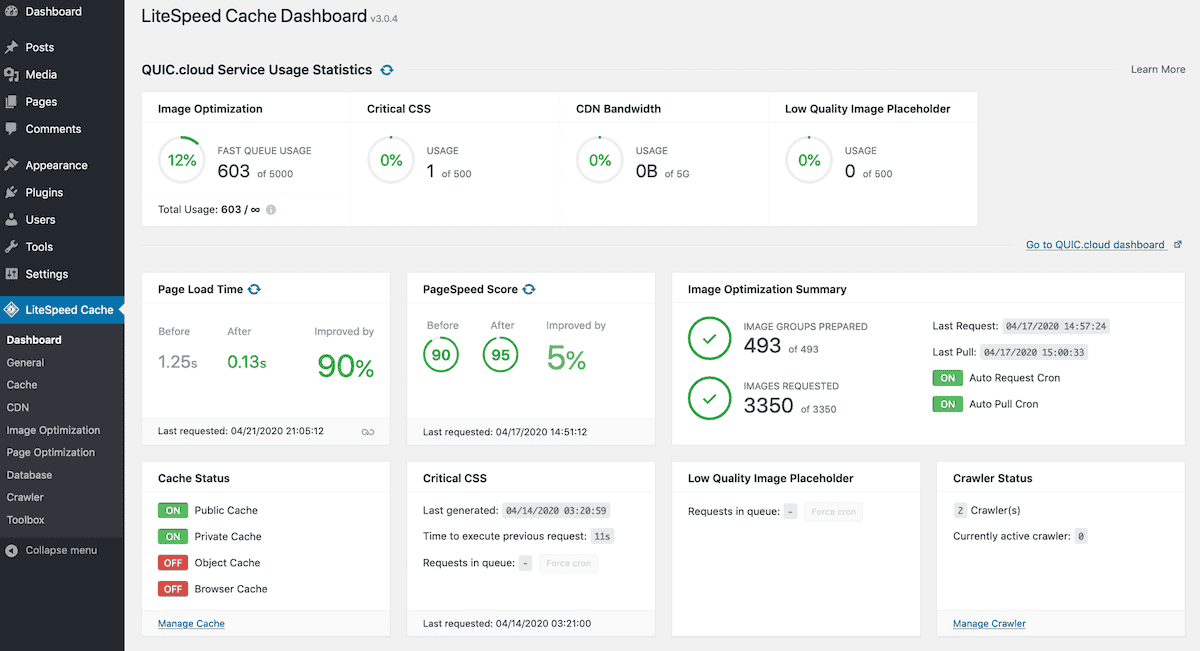
LiteSpeed cache plugin comes with all Core Web Vitals optimization features WP Rocket has, and some extra features, such as free image optimization, Lazy render HTML elements, etc. On high-traffic complex sites, LiteSpeed Cache will handle the load much faster & better than WP Rocket.
Download LiteSpeed Cache plugin.
Frequently Asked Questions (FAQ)
Below are some of the most asked questions related to the WP Rocket cache plugin.
Is there a free version of WP Rocket?
No. WP Rocket is a paid cache plugin. While there are free alternatives like LiteSpeed Cache & W3 Total Cache. WP Rocket justified its price by automating complex tasks that free plugins require you to do manually.
Does WP Rocket replace the need for a CDN?
No. WP Rocket only improves caching and file optimization. You need a CDN (like Cloudflare, BunnyCDN) to deliver your site’s files faster to visitors around the world.
Is WP Rocket compatible with WooCommerce?
Yes, WP Rocket is perfectly compatible with WooCommerce sites. It automatically excludes the Cart, My Account, and Checkout pages from being cached to ensure that your customers’ shopping data stays accurate and secure.
Can I get WP Rocket for free?
Yes, there are hosting providers like Hosting.com/Rocket.net that offer WP Rocket subscription with their managed WordPress hosting plans.
What happens if I don’t renew my license after a year?
WP Rocket continues to work on your site, but you will lose access to support, security updates, and important features like Remove Unused CSS, Critical CSS Generation, etc.
Will WP Rocket help me pass the Core Web Vitals metric?
Yes, WP Rocket can help you to improve Largest Contentful Paint (LCP), Interaction to Next Paint (INP), and Cumulative Layout Shift (CLS) with a few clicks.
Can I get a refund if WP Rocket doesn’t speed up my site?
Yes, WP Rocket offers a 14-day money-back guarantee. If WP Rocket doesn’t improve site performance, you can ask for a refund from your account dashboard (no questions asked).
Final Verdict: Should You Buy WP Rocket in 2026?
Yes. WP Rocket remains the #1 premium caching plugin for 90% of WordPress users. While it is no longer the absolute fastest plugin in my raw benchmarks test (FlyingPress holds that crown), it is the undisputed king of stability, ease of use, and support.
If you value simplicity and support, Buy WP Rocket without a second thought. It is the “Apple” of caching plugins – it just works, it looks good, no need for technical skills, and it won’t break your site every time you change something.
My Personal Recommendation
I have tested almost every WordPress caching plugin on the market for over 7 years.
I keep coming back to WP Rocket for one reason: Peace of Mind. I know that when I install it, it will work. So, if you want to use WP Rocket, start with the Single Plan ($59/year). The time you save not configuring complex settings is worth far more than the cost of the plugin.
However, if you are a performance geek chasing that 100/100 mobile score on PageSpeed Insights and don’t mind tweaking a few settings, check out FlyingPress. It offers much better Core Web Vitals optimization features compared to all other cache plugins.
Here’s my WP Rocket overall ratings:
| Metric | Ratings | Notes |
|---|---|---|
| Ease of Use | ⭐⭐⭐⭐⭐ (5/5) | The best dashboard in the industry. Zero learning curve. |
| Performance | ⭐⭐⭐⭐☆ (4.5/5) | Excellent LCP & TTFB. Slightly behind FlyingPress on CSS & JS optimization. |
| Support | ⭐⭐⭐⭐⭐ (5/5) | Fast, helpful, and actually solves problems. |
| Value | ⭐⭐⭐⭐☆ (4.5/5) | $59 is fair, but the loss of the “Unlimited” plan hurts agencies. |
| OVERALL | 4.8 / 5.0 | The Best “Set-It-And-Forget-It” Speed Solution. |
So, what are you waiting for? Try WP Rocket now. They offer a 14-day money-back guarantee. So, risks are involved.
That’s all for now. If you have any questions related to WP Rocket, let me know. If you’re already using WP Rocket, share your experience with other users to finalize their decision.
Do you feel I left out some WP Rocket features & optimization information? Please let me know in the comments section.
Thank you for reading. Have a nice day.
WP Rocket Review

WP Rocket is one of the most powerful cache WordPress plugins. After installing WP Rocket, It immediately applies to the website and optimizes your website performance by up to 80%.
Price: $59/Year
Price Currency: USD
Operating System: WordPress
Application Category: Plugin
4.8